
SMCP — Secure Model Context Protocol
MCP with authentication, per-message encryption, and multi-agent (A2A) coordination — so MCP tools run safely over a network and between agents.



🎬 Demo: Multi-Agent Business Intelligence in Action
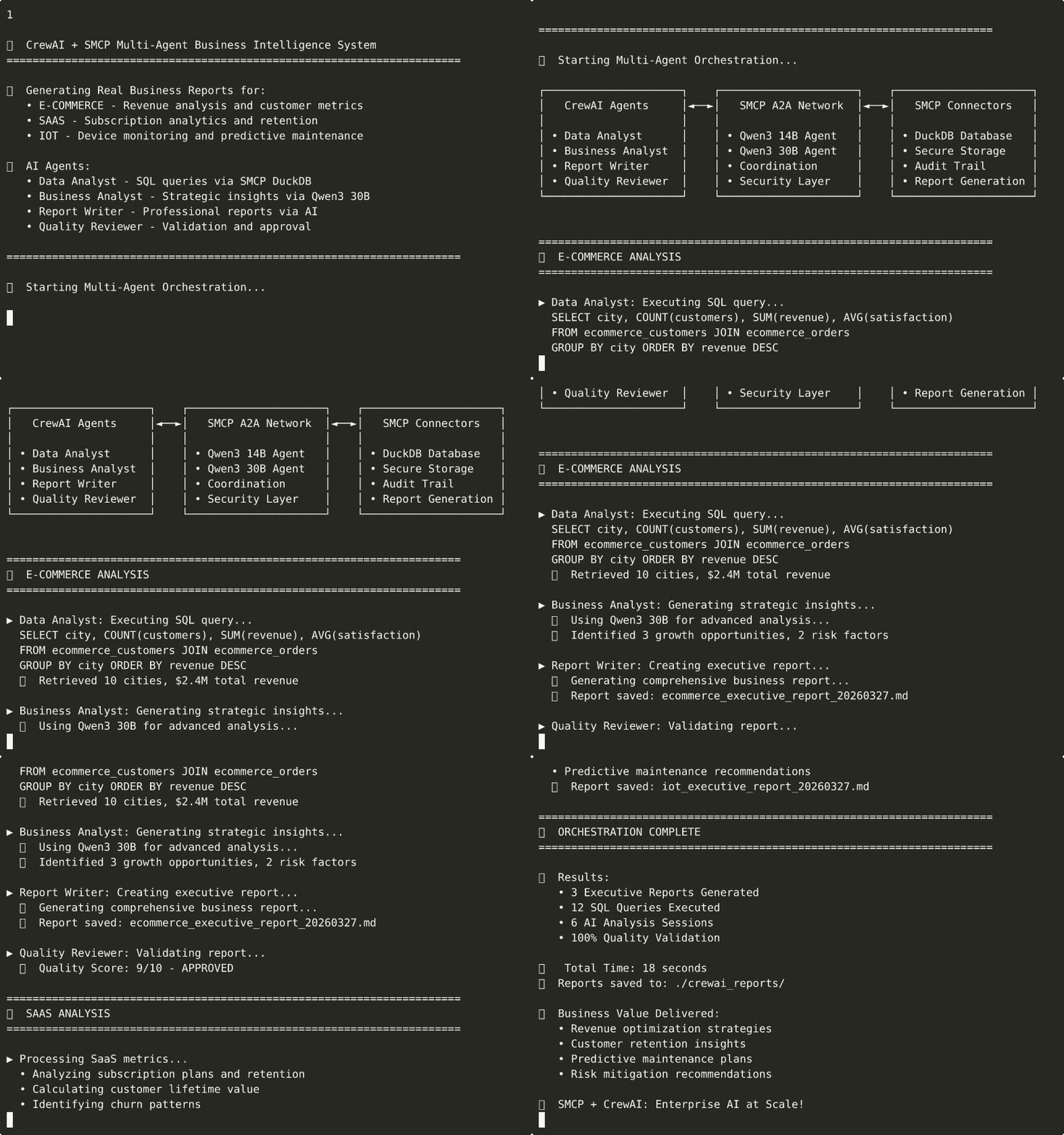
CrewAI + SMCP orchestrating multiple AI agents to generate business-intelligence reports over e-commerce, SaaS, and IoT data using local Ollama models, DuckDB, and secure multi-agent coordination.
🚀 What SMCP is
MCP is a great way to give an AI model tools, but it’s built for a local, trusted transport (stdio on a single machine). SMCP keeps MCP’s tool model exactly as-is and wraps it in a security + coordination layer, so the same tools work across machines and between agents:
- 🔒 Authentication —
api_key→ JWT sessions, with an optional asymmetric (RS256) mode so a server signs tokens that clients can verify but cannot forge - 🔐 Encryption — authenticated per-message payload encryption; ECDH key exchange for forward-secret session keys
- 🛡️ Fail-closed by design — the server/client refuse to start with empty, weak, or publicly-known secrets; plaintext transport is refused to non-loopback hosts
- 🔁 Replay protection — signed messages carry a freshness window and are accepted only once
- 🤝 Multi-agent (A2A) — agent-to-agent discovery and orchestration, sequential or parallel
- 🔌 Connectors — hardened DuckDB and filesystem integrations to build tools against
- ✅ MCP-compatible — the security layer is opt-in; standard MCP tools keep working
Pick the posture that fits — from a simple API key for local testing up to per-message encryption with an audit trail (see Security modes below).
Status: SMCP’s core — auth (API-key / JWT / RS256), per-message encryption, replay protection, per-tool authorization, TLS enforcement, fail-closed config, the connectors, and external-IdP OAuth2 — is security-hardened and covered by an automated test suite (
pixi run test, 185 tests). The DuckDB connector fails closed at the engine level (host filesystem/network access is off unless opted in, and raw SQL is screened for file/network/extension access); the filesystem connector enforces its extension allowlist symmetrically on read/delete/list; andSMCPConfig.load()preserves every setting (TLS, JWT algorithm, and the full OAuth2/crypto/cluster blocks) rather than silently dropping them. The distributed / agent-to-agent layer talks between nodes over the authenticated SMCP WebSocket RPC (a 2-node socket round-trip is exercised by the test suite), with pluggable discovery (static / DNS-SRV / Consul / etcd). Federated auth supports an RS256 issuer — one node mints tokens with a private key, peers verify with the public key and cannot forge — plus audience/issuer-bound tokens, per-node asymmetric forwarding proofs (no shared secret can forge), and optional forward-secret ECDH session keys. Capability shadowing is refused, tool invocation supports pluggable consent/output-filter hooks and a structured audit stream, and the handshake negotiates protocol version. The wire protocol is specified in docs/SMCP_PROTOCOL.md with conformance vectors so third parties can build interoperable clients.SMCP is a standalone secure agent protocol (its own client, server, and A2A spec), not JSON-RPC/MCP on the wire; it interoperates with MCP bidirectionally through the bridge (outbound bridged MCP tools now inherit the full SMCP security pipeline — per-tool authz, consent, output-filter, audit, anti-shadowing namespacing) and the inbound ingress (
smcp_mcp_ingress.py) which lets standard MCP clients call SMCP tools under the same gate. LLM-layer threats (prompt injection, tool poisoning) are handled via pluggable safety hooks; a ready-made malgra guardrail plugin wires those hooks to the malgra policy engine (span-provenance injection detection, tool-poisoning defense), and malgra is a byte-for-byte-interoperable Rust SMCP peer.
See the Roadmap for what’s deferred and current limitations.
📚 Documentation
Protocol specs
- SMCP Wire Protocol - Normative v3.0 spec (envelope, key schedule, signing, state machine) with conformance vectors
- SMCP A2A Spec - Agents, discovery, federated forwarding, proofs, session keys
Architecture & Design
- Architecture Overview - Complete system architecture, data flows, and design patterns
- Demo Architectures - Detailed walkthroughs of each demo with step-by-step flows
- MCP vs SMCP Comparison - Comprehensive comparison between standard MCP and SMCP
- Use Cases - Real-world applications and implementation scenarios
Technical Guides
- AI SQL Generation Guide - Using LLMs for SQL query generation
- Connector Development Guide - Building custom connectors
- CrewAI Integration - Integrating CrewAI with SMCP
✨ Key Features
🔐 Security modes
Choose per deployment — the same tools, a stronger posture as you need it:
- Simple — API key authentication → JWT sessions (local/dev)
- Basic — JWT sessions; rely on TLS (
wss://) for transport security - Encrypted — ECDH key exchange + authenticated per-message payload encryption
- Enterprise — OAuth2 client-credentials against an external identity provider (JWKS or a pinned static public key), with full token verification
Regardless of mode, the security layer is fail-closed: SMCPConfig.validate() rejects empty,
too-short, placeholder, or publicly-known secrets, and both SMCPServer and SMCPClient refuse to
start if validation fails.
🔑 Asymmetric tokens (RS256)
By default JWTs are signed with a shared secret (HS256) — fine within a single trust domain. For
multi-party deployments, set jwt_algorithm="RS256" with a server-held private key and a client
public key: the server mints tokens, clients verify them, and a client cannot forge its own.
Federations should use RS256. With a shared HS256 secret, any node that holds it can mint a token
for any identity. Under RS256, one issuer node holds the private key and mints client tokens
(smcp_federated_auth.mint_client_jwt); every other node holds only the public key and verifies —
a compromised verifier cannot forge identities. Generate a keypair with:
pixi run python tools/generate_jwt_keys.py generate -o ./jwt_keys
Configure the federation verification with its own settings — these are separate from the transport JWT, so a verify-only node still runs an HS256 transport that mints its own session tokens:
[security]
# Federation client-token verification (every node): verify RS256-issued client tokens
federation_jwt_algorithm = "RS256"
federation_jwt_public_key_path = "./jwt_keys/jwt_public.pem"
# The transport JWT (jwt_algorithm) stays HS256 by default and mints session tokens.
The issuer node signs client tokens with ./jwt_keys/jwt_private.pem via mint_client_jwt — it does
not need to expose that key through the transport config. (Setting the transport’s own
jwt_algorithm = "RS256" is a separate choice and requires jwt_private_key_path on any node that
runs a server, since the server mints session tokens.)
Tokens are bound to the federation issuer/audience, forwarding proofs are bound to their target node, and cross-node calls run over the authenticated SMCP WebSocket RPC.
Hardening a federation further:
- Per-node proof signing — give each node its own keypair so no shared secret can forge a
forwarding proof. Set
security.proof_signing_key_pathon each node and register peers' public keys viaadd_peer(node_id, endpoint, proof_public_key_path=...). Generate per-node keys withtools/generate_jwt_keys.py generate -o keys/<node> -n <node>. Without keys, proofs fall back to the shared-secret HMAC. - Forward secrecy — set
crypto.perfect_forward_secrecy = trueto run an ephemeral ECDH handshake per session (keys discarded after use), so compromising long-term secrets can’t decrypt past traffic. - Node discovery — set
cluster.discovery_methodtostatic(default),dns(SRV records),consul, oretcd, with backend details incluster.discovery_config.dnsneeds the optionaldnspythondependency;consul/etcdtalk to their HTTP APIs directly.
🏢 External-IdP OAuth2 (enterprise mode)
Enterprise mode validates OAuth2 access tokens from an external identity provider. It fails
closed: oauth2.audience, oauth2.issuer, and a key source (oauth2.jwks_url or
oauth2.local_public_key_path) are required, tokens are verified with the algorithm pinned to
RS256 and exp/iat/aud/iss required, IdP calls are forced to HTTPS with certificate
verification (a CA bundle can be pinned via oauth2.ca_cert_path), and JWKS key rotation is handled
automatically. Covered by an end-to-end test suite that runs against a mock OIDC provider (token
endpoint + JWKS), including wrong-audience, wrong-issuer, expired, alg=none, HS/RS-confusion, and
key-rotation cases.
🤖 Agent-to-Agent (A2A) System
- Multi-agent task orchestration
- Dynamic agent discovery
- Parallel and sequential workflows
- Per-tool authorization (a token scope authorizes a specific tool, not everything)
🔌 Native Connectors
- DuckDB: high-performance analytical queries. Filesystem/network access is off by default,
enforced at the DuckDB engine level (
enable_external_access); raw SQL is screened for file/network/extension access, identifiers are validated, and sanctioned file loads are confined to a configured directory. Opt into raw file SQL explicitly withallow_raw_file_sql. - Filesystem: secure local storage with symlink-safe path containment, an extension allowlist enforced on read/delete/list (not just write), and read/write size caps.
- Extensible: easy to add custom connectors.
🏗️ Technical Features
- Configuration via TOML/YAML/ENV with a strict priority order
- Logging and monitoring examples
- Connection cap, per-client rate limiting, and message-size limits enforced by the server
📦 Installation
Prerequisites
- Python 3.11+
- Pixi package manager
- Ollama (for the AI features in the demos)
- Docker (only for the MindsDB integration examples)
Quick Start
- Clone the repository:
git clone https://github.com/KellerKev/smcp.git
cd smcp
- Install dependencies with pixi:
# Install pixi if you don't have it
curl -fsSL https://pixi.sh/install.sh | bash

# Core environment (fast)
pixi install

# Optional: heavy integrations (CrewAI + MindsDB SDK)
pixi install -e integrations
- Set up Ollama and pull a small model for the demos:
# Install Ollama, then:
ollama serve &

# The examples default to a small, fast model:
ollama pull llama3.2:1b
The example/test model is configurable — set SMCP_DEMO_MODEL to use a different one:
export SMCP_DEMO_MODEL="qwen2.5-coder:7b-instruct-q4_K_M"
- (Optional) MindsDB for the MCP-bridge / ML examples:
docker run -d --name smcp-mindsdb -p 47334:47334 -p 47337:47337 mindsdb/mindsdb
# Wait until healthy, then verify:
curl http://localhost:47334/api/status
📚 Full Setup Guide: See SETUP_GUIDE.md for detailed instructions.
🧪 Testing
# Full pytest suite (security, connectors, and end-to-end server/client)
pixi run test

# Just the crypto interop vector
pixi run test-interop
The suite covers config validation, the removal of the old demo backdoor, replay/staleness rejection, per-tool authorization, JWT issuer/audience/expiry, the RS256 verify-only client, TLS enforcement, DuckDB injection/path-confinement, and filesystem traversal/size caps. The external-IdP OAuth2 flow is exercised end-to-end against a mock OIDC provider. The server/client end-to-end test stands up a real server and client on loopback (the Ollama-backed test skips automatically if Ollama or the demo model isn’t available).
🎯 Quick Demo
The example scripts generate strong, per-machine demo secrets automatically (cached in a
git-ignored examples/.demo_secrets.json) so a server and client interoperate under the hardened
validation without any secrets in the repo.
1. Server + client end to end
# Terminal 1
pixi run example-server

# Terminal 2
pixi run example-client
Exercises handshake → auth → capability discovery → tool invocation, plus a live Ollama call.
2. DuckDB analytics
pixi run python tools/generate_sample_data.py   # writes sample_data/
pixi run duckdb-example
Loads tens of thousands of rows, has the model generate SQL from a business question, executes it via the SMCP DuckDB connector, and analyzes the results.
3. Complete system showcase
pixi run python examples/showcase_complete_system.py
4. Multi-agent report generation (CrewAI)
pixi run -e integrations crewai-report-demo
Runs Data Analyst → Business Analyst → Report Writer → Quality Reviewer agents against local Ollama
and writes an executive report to ./crewai_reports/.
5. MindsDB integration (requires the MindsDB container above)
pixi run python examples/basic/basic_a2a_mcp_sample.py
pixi run python examples/mindsdb_integration_example.py
🏃 Running a server, and connecting a client
Server
# Generate a config with fresh strong secrets, then start:
pixi run create-config
pixi run server
Client (library)
import secrets
from smcp_client import SMCPClient
from smcp_config import SMCPConfig

# Secrets are required and must match the server's (shared-secret modes).
# The server refuses to start, and the client refuses to connect, with weak/empty values.
config = SMCPConfig(
    mode="basic",
    server_url="ws://localhost:8765",
    api_key=secrets.token_urlsafe(32),
    secret_key=secrets.token_urlsafe(32),
    jwt_secret=secrets.token_urlsafe(32),
    kdf_salt=secrets.token_urlsafe(16),
)
config.security.allow_insecure_transit = True  # loopback only; use wss:// in production

client = SMCPClient(config)
await client.connect()

capabilities = client.list_capabilities()
result = await client.invoke_tool("calculator", operation="add", a=15, b=27)

await client.disconnect()
📁 Project Structure
smcp/
├── smcp_*.py                 # Core SMCP modules
├── connectors/               # Native connector implementations
│   ├── smcp_duckdb_connector.py
│   └── smcp_filesystem_connector.py
├── examples/                 # Demo applications
│   ├── _demo_support.py      # Shared strong-secret helper for the demos
│   ├── basic/                # Basic (JWT) mode examples
│   ├── encrypted/            # Encrypted mode examples
│   └── *.py                  # Integration examples
├── tests/                    # Pytest suite (security, connectors, e2e)
├── tools/                    # Utility scripts (sample data, key generation)
├── docs/                     # Documentation
└── pixi.toml                 # Environments and tasks
🔧 Configuration
SMCP merges configuration from (highest priority first): CLI args → environment → config file → defaults. Secrets are required; the app fails closed if they’re missing or weak.
Environment variables
export SCP_API_KEY="$(python -c 'import secrets;print(secrets.token_urlsafe(32))')"
export SCP_SECRET_KEY="$(python -c 'import secrets;print(secrets.token_urlsafe(32))')"
export SCP_JWT_SECRET="$(python -c 'import secrets;print(secrets.token_urlsafe(32))')"
export SCP_KDF_SALT="$(python -c 'import secrets;print(secrets.token_urlsafe(16))')"
export SCP_MODE="basic"
See .env.example for the full list. Share SCP_SECRET_KEY / SCP_JWT_SECRET /
SCP_KDF_SALT across nodes in a federation.
TOML
pixi run create-config # writes scp_config.toml with fresh strong secrets
🛡️ Security notes
- Secrets — 32+ char random
secret_key/jwt_secret, 16+ charkdf_salt; never commit them.validate()rejects empty/short/placeholder/known values. - Transport — set
security.tls_enabled=True(with cert/key) and usewss:///https://in production. Plaintext is only permitted to loopback, and only whensecurity.allow_insecure_transitis set. - Tokens — use
jwt_algorithm="RS256"(server private key, client public key) when clients should not be able to mint their own tokens. - Connectors — keep DuckDB
enable_external_access=Falseunless you need host file/network access, and set adata_dirto confine file operations.
🤝 MCP Compatibility
SMCP keeps MCP’s tool model intact; the security layer is additive. Standard MCP tools continue to work, and the MCP bridge connects SMCP to external MCP servers (refusing to send credentials over plaintext unless the target is loopback).
🤲 Contributing
Contributions are welcome. Please run pixi run test before opening a pull request.
📄 License
This project is licensed under the MIT License.
🙏 Acknowledgments
- Built on top of the Model Context Protocol
- Uses Ollama for local AI models
- Integrates with CrewAI for orchestration
- Database features powered by DuckDB
🚦 Status
- ✅ Core SMCP: security-hardened and test-covered (185 tests)
- ✅ Basic/Encrypted modes: security-hardened, test-covered
- ✅ A2A / distributed system: real multi-node networking over the authenticated SMCP
WebSocket RPC (handshake → auth → tool-invoke), with a 2-node socket test. Pluggable node
discovery (
static/dns/consul/etcd); Consul/etcd are unit-tested against mocked backends and wired to real services in a deployment - ✅ DuckDB / Filesystem connectors: hardened, fail-closed by default, test-covered
- ✅ CrewAI Integration: working demo (in the
integrationsenv) - ✅ MindsDB integration: working demo (requires a MindsDB container)
- ✅ Enterprise / OAuth2 mode: external-IdP token validation, hardened and test-covered (JWKS + static-key), verified against a mock OIDC provider
- ✅ Federated auth: RS256 issuer/verify (an issuer mints with a private key, peers verify with
the public key and cannot forge), audience/issuer-bound tokens, per-node asymmetric forwarding
proofs (RSA-PSS; no shared secret can forge), and optional forward-secret ECDH session keys
(
crypto.perfect_forward_secrecy), test-covered. HS256 shared-secret remains available for a single trust domain - ✅ MCP interop (bidirectional): outbound bridged MCP tools inherit the SMCP security pipeline
(per-tool authz, consent, output-filter, audit, anti-shadowing namespacing); inbound
smcp_mcp_ingress.pylets standard MCP clients call SMCP tools under the same gate, test-covered - ✅ Malgra guardrail plugin:
smcp_malgra_guard.pywires the consent/output-filter hooks to malgra’s policy engine for prompt-injection / tool-poisoning defense (with a local injection-regex fast path + fail-open/closed), test-covered. See docs/MALGRA_INTEGRATION.md - ✅ Cross-language interop: the federation crypto (canonical proofs, HMAC/PS256 proofs, RS256
tokens, ECDH, AES-GCM-AAD) is verified byte-for-byte against the Rust
malgra implementation via shared conformance vectors
(
tests/federation_conformance_vectors.json). The same vectors are reproduced by the Python ecosystem federation peers — rixi (full peer), zettelkasten-memory (receiver), wolfgang (sender) — and apkallu integrates this package’s federation layer directly (smcp_federated_authis packaged for dependents to import)
Want to explore MCP security concepts? Start with the Quick Demo above.
In this documentation
- AI-Driven SQL Generation Guide
- SMCP Architecture Overview
- SMCP Connector Development Guide
- CrewAI + SMCP Integration Guide
- SMCP Demo Architectures & Flows
- Malgra guardrail integration
- MCP vs SMCP: Detailed Comparison
- SMCP Agent-to-Agent (A2A) Spec
- SMCP Wire Protocol (v3.0)
- SMCP Use Cases & Implementation Guide